Introduction
A reliable internet connection is essential in today’s connected world, and a Broadband Speed Checker is a vital tool for assessing performance. Whether for work, streaming, gaming, or online education, knowing your broadband speed ensures smooth connectivity and efficient use of your internet plan.
Broadband speed checkers measure your connection’s download and upload rates, latency, and stability. They help users detect slow speeds, troubleshoot network issues, and verify that their internet service provider (ISP) is delivering promised speeds. By using a broadband speed checker regularly, you can optimize network settings, plan upgrades, and enhance your overall internet experience.
This comprehensive guide explains what broadband speed checkers are, how they work, factors affecting speed, and practical tips to improve connectivity. It’s designed for both casual users and IT professionals seeking accurate and actionable insights.
What Is a Broadband Speed Checker?
A broadband speed checker is an online tool or application that tests your internet connection. It provides key metrics such as:
- Download speed: The rate at which data is received from the internet
- Upload speed: The rate at which data is sent to the internet
- Ping/latency: Time for data to travel to a server and back
- Jitter: Variation in latency, affecting streaming and gaming
Why Broadband Speed Checkers Matter
- Verify ISP speed promises
- Identify internal network issues
- Troubleshoot WiFi or hardware problems
- Plan for high-demand applications like streaming or video conferencing
For instance, if your ISP advertises 100 Mbps but the speed checker shows 50 Mbps, you can investigate whether the issue lies in your router, WiFi setup, or the ISP itself.
How a Broadband Speed Checker Works
Broadband speed checkers send data packets from your device to a server and measure how quickly they are transmitted and received.
Step-by-Step Process
- Choose a nearby server for testing.
- Perform a download test: data is sent from the server to your device.
- Perform an upload test: data is sent from your device to the server.
- Measure latency and jitter during the tests.
- Display results including Mbps for download/upload and milliseconds for ping.
Real-World Example
Streaming 4K video requires a minimum of 25 Mbps. A speed checker revealing only 15 Mbps explains why buffering occurs during playback.
Factors Affecting Broadband Speed
Several factors can impact your broadband performance:
Common Factors
- ISP limitations or throttling
- Router hardware and firmware
- WiFi interference from other devices or networks
- Number of connected devices
- Peak usage times causing network congestion
- Device performance and settings
Identifying these factors allows for targeted troubleshooting and performance improvements.
Tips for Running an Accurate Broadband Speed Test
Accuracy is key when measuring internet performance.
Best Practices
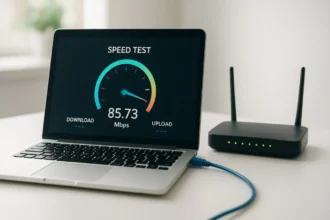
- Use a wired Ethernet connection if possible
- Close unnecessary apps or devices consuming bandwidth
- Test at different times of day to identify congestion
- Use multiple servers for consistent results
Popular Broadband Speed Checker Tools
- Speedtest.net by Ookla
- Fast.com by Netflix
- Google speed test
- ISP-provided testing tools
How to Improve Broadband Speed
If the speed checker results show lower-than-expected speeds, consider these solutions:
Practical Solutions
- Restart modem and router regularly
- Update router firmware and device network drivers
- Optimize router placement for better WiFi coverage
- Change WiFi channels to reduce interference
- Upgrade internet plan or router for higher throughput
Advanced Tips
- Use wired connections for critical devices
- Deploy mesh WiFi systems for large homes
- Configure Quality of Service (QoS) for priority devices
Benefits of Using a Broadband Speed Checker
- Verify ISP claims and plan accuracy
- Identify network bottlenecks quickly
- Improve streaming, gaming, and video call performance
- Plan future upgrades and expansions
Regular checks ensure consistent and reliable internet performance.
Conclusion
A Broadband Speed Checker is an essential tool for anyone seeking to monitor and optimize internet performance. By understanding your connection’s download, upload, and latency metrics, you can troubleshoot issues, verify ISP performance, and enhance connectivity for streaming, gaming, and work. Regular use of a broadband speed checker ensures that your network remains fast, reliable, and efficient.
FAQs
1. What is a broadband speed checker?
A tool that measures your internet connection’s download, upload speeds, and latency.
2. Why should I use a broadband speed checker?
To verify ISP performance, troubleshoot issues, and optimize connectivity.
3. What affects broadband speed?
Factors include ISP limitations, router quality, WiFi interference, connected devices, and peak usage times.
4. Can broadband speed checkers improve internet speed?
No, they identify issues; optimizing hardware or plan upgrades improves speed.
5. How often should I check broadband speed?
Regularly, especially when experiencing slow performance or changing network setups.