Introduction
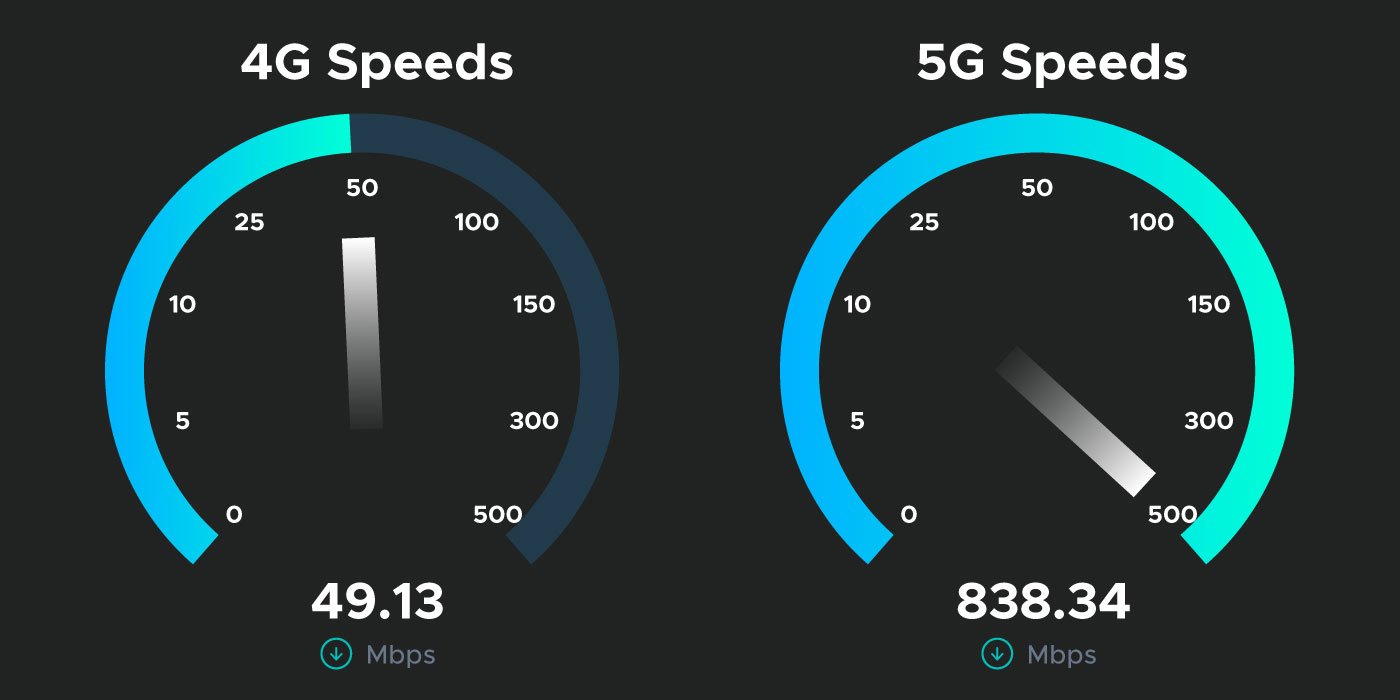
With the rise of 4G and 5G networks, mobile connectivity has reached unprecedented speeds, enabling high-quality streaming, video conferencing, and real-time gaming. A 4G/5G Speed Test is an essential tool for measuring your mobile network’s performance, identifying issues, and ensuring you are getting the speeds promised by your carrier.
While ISPs and mobile carriers advertise impressive download and upload speeds, real-world performance can vary due to location, congestion, and device limitations. Conducting a 4G/5G speed test helps users understand actual performance, optimize network settings, and make informed decisions about mobile plans and device upgrades.
This comprehensive guide covers how 4G and 5G speed tests work, factors affecting mobile network performance, tips for accurate testing, and strategies to improve speeds for a seamless mobile experience.
What Is a 4G/5G Speed Test?
A 4G/5G speed test measures the performance of your mobile network, providing metrics such as:
- Download speed: Rate at which data is received from the network
- Upload speed: Rate at which data is sent from your device
- Ping/latency: Time it takes for data to travel to a server and back
- Jitter: Variation in latency affecting streaming and online gaming
Why Speed Tests Are Important
- Verify carrier speed claims
- Identify weak signal areas or network congestion
- Optimize mobile network settings
- Evaluate device performance on high-speed networks
For example, streaming 4K content on a 5G network requires consistent download speeds above 50 Mbps. A speed test showing lower results may indicate congestion, signal issues, or device limitations.
How 4G/5G Speed Tests Work
Speed tests measure mobile network performance by sending and receiving data between your device and a test server.
Step-by-Step Process
- The speed test selects the nearest server.
- Download test: Data is sent from the server to your device.
- Upload test: Data is sent from your device to the server.
- Latency and jitter are measured throughout the transfer.
- Results display download/upload speeds in Mbps and latency in milliseconds.
Real-World Example
A user testing 5G speeds at a busy urban location may observe fluctuating speeds due to network congestion. Running multiple tests at different times can help identify peak usage times and optimize performance.
Factors Affecting 4G/5G Speeds
Multiple variables influence mobile network performance:
Common Factors
- Network coverage: Signal strength varies by location
- Carrier congestion: Peak hours may slow speeds
- Device capability: Older devices may not support maximum 4G/5G speeds
- Distance from cell towers: Greater distance reduces speed
- Obstructions: Buildings, terrain, and weather can affect signal quality
Understanding these factors allows users to troubleshoot and optimize their mobile experience.
Tips for Accurate 4G/5G Speed Testing
For reliable results, follow these best practices:
- Test in multiple locations for comparison
- Close background apps consuming data
- Avoid testing during network congestion when possible
- Use reputable speed test apps like Speedtest.net, Fast.com, or carrier-specific tools
Best Practices for Home and Work Use
- Ensure devices are updated with the latest firmware
- Keep the SIM card and device in good condition
- Test speeds indoors and outdoors to assess coverage
How to Improve 4G/5G Speeds
After identifying network performance, users can take steps to enhance mobile connectivity.
Practical Solutions
- Move to areas with stronger signal
- Upgrade to a device compatible with the latest network technology
- Restart your device to refresh network settings
- Use mobile signal boosters for indoor coverage
- Contact your carrier if speeds are consistently below advertised levels
Advanced Optimization
- Enable 5G mode in device settings if available
- Switch between 4G and 5G based on performance and coverage
- Use WiFi calling to reduce network congestion impact
Benefits of Using a 4G/5G Speed Test
- Ensure you get speeds promised by your carrier
- Identify optimal locations for work or entertainment
- Optimize mobile devices for performance
- Monitor network performance over time
- Make informed decisions about upgrades or carrier changes
Conclusion
A 4G/5G Speed Test is essential for understanding and optimizing mobile network performance. By regularly measuring download, upload, and latency metrics, users can identify weak signal areas, troubleshoot issues, and ensure smooth streaming, gaming, and communication experiences. Leveraging these tests ensures that you maximize the capabilities of 4G and 5G networks for reliable mobile connectivity.
FAQs
1. What is a 4G/5G speed test?
A tool that measures mobile network performance including download/upload speeds and latency.
2. Why should I perform a 4G/5G speed test?
To verify carrier claims, identify weak coverage areas, and optimize device performance.
3. What factors affect 4G/5G speeds?
Signal strength, network congestion, device capability, distance from towers, and obstructions.
4. How can I improve my 4G/5G speed?
Move to better coverage areas, upgrade devices, restart devices, or use signal boosters.
5. Are 4G and 5G speeds consistent everywhere?
No, speeds vary based on coverage, congestion, and device compatibility.